Business-to-business (B2B) operations depend on a continuous exchange of documents. Invoices, purchase orders, contracts, delivery receipts, onboarding forms, tax documents, and compliance records move between organizations every day. Although these documents are essential for running a business, processing them manually can consume significant time, introduce errors, delay approvals, and increase operational costs.
As businesses grow, the volume and complexity of their documentation increase. Finance teams must reconcile invoices with purchase orders, procurement departments must verify supplier information, and operations teams must maintain accurate records across multiple systems. Traditional document management methods often struggle to keep pace with these demands.
This is where intelligent document processing (IDP) becomes valuable.
Intelligent document processing uses artificial intelligence (AI), optical character recognition (OCR), machine learning (ML), natural language processing (NLP), and automation to extract, classify, validate, and process information from business documents. Rather than simply digitizing paper records, IDP transforms unstructured and semi-structured documents into usable business data.
For B2B organizations, intelligent document processing can help automate repetitive administrative tasks, improve data accuracy, accelerate workflows, and create more scalable operations.
In this article, we explore what intelligent document processing is, how it works, its key benefits, practical B2B applications, implementation challenges, and the best practices businesses can follow to maximize its value.
What Is Intelligent Document Processing (IDP)?
Intelligent document processing is an AI-powered technology that automatically captures, reads, understands, extracts, and validates information from documents.
Unlike conventional document scanning tools, which primarily convert physical documents into digital files, IDP interprets the information contained within those files and prepares it for further processing.
For example, when a business receives a supplier invoice, an IDP solution can identify the supplier’s name, invoice number, invoice date, purchase order number, tax details, payment terms, and total amount. It can then validate the extracted information against relevant business records and transfer approved data into an enterprise resource planning (ERP) or accounting system.
This reduces the need for employees to enter information manually.
Intelligent document processing can handle multiple document formats, including:
- Scanned paper documents and PDFs.
- Digital invoices and purchase orders.
- Supplier contracts and agreements.
- Customer onboarding forms.
- Tax documents and compliance records.
- Delivery receipts and shipping documents.
- Bank statements and financial reports.
- Emails containing business attachments.
Modern IDP platforms can also process documents with different layouts, inconsistent formatting, tables, handwritten entries, and complex field relationships, depending on the capabilities of the solution.
In simple terms, intelligent document processing converts business documents into structured, actionable data that organizations can use to automate their operations.
Why B2B Operations Need Intelligent Document Processing
B2B transactions involve multiple stakeholders, systems, and approval stages. A single purchase may generate a purchase requisition, purchase order, supplier invoice, delivery receipt, payment record, and compliance document.
When these documents are processed manually, information must often be entered repeatedly into different systems. Even small errors can create discrepancies, trigger additional verification, and delay business transactions.
Several operational challenges make document automation increasingly important.
1. High volumes of business documents
Growing organizations process thousands of documents across finance, procurement, logistics, sales, and customer operations. Manual processing becomes difficult to scale as transaction volumes increase.
2. Fragmented document formats
Suppliers and customers rarely follow identical document formats. Different templates, naming conventions, file types, and data structures make conventional rule-based extraction less flexible.
3. Repetitive data entry
Employees frequently copy information from invoices, forms, contracts, and spreadsheets into business applications. This work is time-consuming and limits the time available for analysis and decision-making.
4. Errors and inconsistencies
Manual data entry can introduce incorrect invoice numbers, missing fields, duplicate records, or inaccurate payment amounts. These issues can affect financial reporting, supplier relationships, and compliance.
5. Slow approval cycles
Documents may remain in email inboxes or wait for manual verification before moving to the next stage. These delays can affect payment schedules, procurement activities, and customer onboarding.
Intelligent document processing addresses these challenges by automating document-related tasks while enabling human review for exceptions, ambiguous information, and high-risk decisions.
How Intelligent Document Processing Works
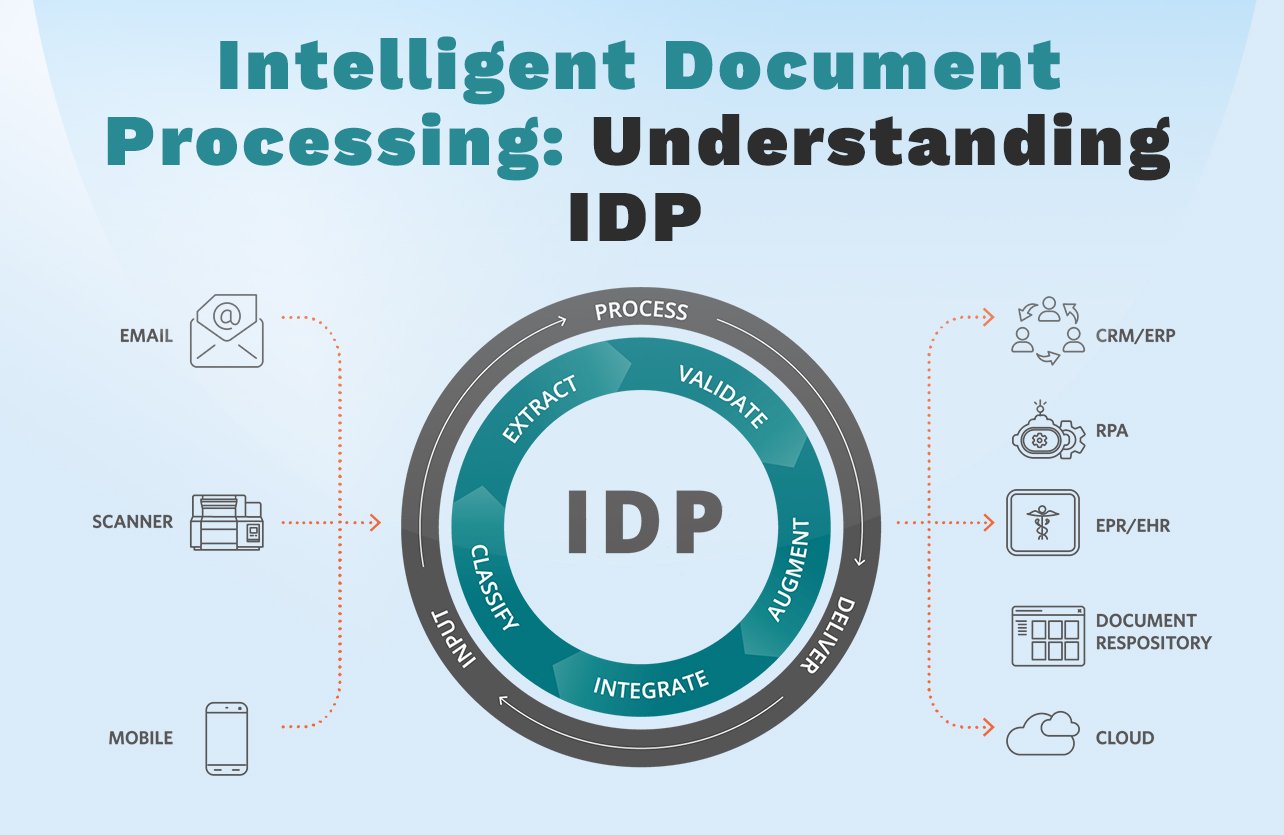
An intelligent document processing workflow generally follows several stages. The exact process depends on the document type, business rules, and software integrations.
Step 1: Document ingestion
The process begins when documents enter the system through email attachments, scanned files, shared folders, customer portals, enterprise applications, or application programming interfaces (APIs).
An IDP platform collects these documents and prepares them for processing.
For example, a finance department might configure the system to automatically capture incoming supplier invoices from a dedicated accounts payable email address.
Step 2: Document classification
The system identifies the document type before extracting information.
Using machine learning and document analysis, it can distinguish between an invoice, purchase order, contract, delivery receipt, or onboarding form.
Classification helps the system apply the correct extraction model and validation rules to each document.
Step 3: Data extraction using OCR and AI
Optical character recognition converts text from scanned documents and images into machine-readable information.
AI-powered extraction technologies then identify relevant fields, tables, entities, and relationships within the document.
For instance, the system can recognize an invoice’s total amount even when the invoice layout differs from previously processed documents.
Advanced platforms may use language models and other AI techniques to interpret context, handle complex layouts, and extract information from less structured documents.
Step 4: Data validation and verification
Extracted information must be checked before it is used in downstream business processes.
An IDP system can validate invoice details against purchase orders, supplier master records, tax information, or predefined business rules.
For example, if the invoice amount differs from the approved purchase order, the system can flag the discrepancy for review rather than automatically approving the transaction.
Validation rules vary by organization and should reflect its financial controls, compliance requirements, and operating procedures.
Step 5: Human review and exception handling
Not every document can be processed with complete confidence. Poor image quality, handwritten content, missing information, and unusual document layouts can affect extraction accuracy.
IDP workflows can route uncertain fields or exceptions to employees for review.
This human-in-the-loop approach allows staff to correct errors, resolve discrepancies, and approve sensitive transactions while leaving routine processing to automation.
Step 6: Workflow automation and system integration
Once the information has been validated, the system can send structured data to ERP platforms, customer relationship management (CRM) systems, accounting software, procurement applications, or document management systems.
Depending on the workflow, it can also initiate approvals, update records, generate notifications, and trigger subsequent business actions.
Step 7: Monitoring and continuous improvement
Organizations can monitor processing accuracy, exception rates, turnaround times, and other operational metrics.
Feedback from reviewers can help improve extraction models and business rules where supported by the platform.
Continuous monitoring ensures that the solution remains aligned with changing document formats, business requirements, and transaction volumes.
Key Benefits of Intelligent Document Processing for B2B Businesses
Intelligent document processing offers benefits beyond converting paper records into digital files. When integrated into business workflows, it can improve how information moves across departments and organizations.
1. Reduced manual workload
One of the primary benefits of intelligent document processing is the reduction of repetitive administrative tasks.
Employees no longer need to manually enter every invoice field, categorize each document, or copy information between applications. Automation can handle routine steps while employees focus on exception management, supplier relationships, financial analysis, and strategic decisions.
This can improve productivity without requiring organizations to expand their administrative teams at the same rate as transaction volumes.
2. Improved data accuracy
Manual data entry increases the risk of transcription errors, missing fields, and inconsistent records.
IDP combines AI-based extraction with validation rules to help identify errors before information reaches downstream systems.
For example, matching invoice details against purchase orders and supplier records can help detect incorrect amounts, missing purchase order references, or potential duplicate invoices.
Accuracy still depends on document quality, extraction performance, validation logic, and appropriate human oversight. Organizations should measure actual results rather than assume that automation eliminates every error.
3. Faster document turnaround times
Manual document processing often involves several handoffs between employees and departments. Intelligent document processing can reduce these delays by automatically classifying documents, extracting information, and routing tasks to the appropriate workflow.
Invoices can reach approval stages faster, customer onboarding documents can be reviewed sooner, and procurement teams can access required information with less manual intervention.
Faster processing can also improve supplier communication and help businesses meet internal service-level agreements.
4. Lower operational costs
Document processing costs include employee time, error correction, document storage, administrative overhead, and delays caused by incomplete information.
IDP can reduce some of these costs by automating repetitive work and minimizing avoidable reprocessing.
The financial benefits depend on document volume, current processing costs, implementation expenses, software licensing, integration requirements, and ongoing maintenance.
Organizations should evaluate the total cost of ownership against measurable savings when assessing an IDP investment.
5. Greater scalability
As B2B organizations expand into new markets, onboard more suppliers, or increase transaction volumes, document processing requirements grow.
Manual workflows may require additional staff to handle the increased workload. Intelligent document processing can help businesses process higher volumes without increasing manual effort proportionally.
This makes IDP particularly useful for shared service centers, large procurement departments, financial operations teams, and businesses managing complex supplier networks.
6. Better compliance and audit readiness
Business documents often contain information required for financial audits, regulatory reporting, contractual verification, and internal controls.
IDP can support compliance by standardizing data capture, improving record consistency, and maintaining processing histories where the platform supports audit logging.
Organizations can also configure validation rules to identify missing information, expired documents, or inconsistencies that require attention.
However, IDP does not automatically guarantee compliance. Businesses must implement appropriate access controls, retention policies, audit procedures, and regulatory safeguards.
7. Improved visibility across business workflows
When documents are processed manually, it can be difficult to determine where a transaction is delayed or why an approval remains pending.
Integrated IDP workflows can provide visibility into document status, processing stages, exceptions, and outstanding approvals.
This information helps managers identify bottlenecks, monitor service levels, and make informed operational decisions.

Top Use Cases of Intelligent Document Processing in B2B Operations
Intelligent document processing is relevant across multiple departments. The following use cases illustrate how businesses can apply IDP to real operational challenges.
1. Accounts payable and invoice processing
Accounts payable is one of the most common applications of intelligent document processing.
Finance teams receive invoices in different formats and must capture supplier details, invoice numbers, tax amounts, line items, payment terms, and totals.
An IDP solution can extract these details, validate them against purchase orders and goods receipts, identify potential duplicates, and route discrepancies for review.
Once the necessary checks are complete, the system can transfer approved invoice data to the accounting or ERP platform.
This helps reduce repetitive data entry, improve invoice visibility, and support faster payment processing.
2. Procurement and purchase order management
Procurement departments manage purchase requests, supplier quotations, purchase orders, delivery documents, and related correspondence.
Intelligent document processing can extract relevant information from these records and compare details across documents.
For example, a system can help verify whether the quantities and prices on an invoice match the corresponding purchase order and receipt.
By automating document validation and routing, organizations can improve procurement efficiency and reduce the administrative burden associated with supplier transactions.
3. Contract management
B2B contracts contain important information about pricing, renewal dates, payment terms, service-level agreements, and contractual obligations.
Manually reviewing large volumes of contracts can be time-consuming, especially when documents vary in structure and language.
IDP can extract key contract fields, identify relevant clauses, organize documents, and support searches across contract repositories.
This can help legal, procurement, and finance teams locate important information more efficiently.
AI-extracted contractual information should still be reviewed by qualified personnel when it affects legal obligations, risk assessments, or critical business decisions.
4. Supplier onboarding
Supplier onboarding often requires businesses to collect registration forms, tax certificates, bank details, compliance documents, and company information.
IDP can extract information from these documents, check whether required fields are present, and compare submitted details against supplier records.
Missing information can trigger automated requests for clarification, while exceptions can be routed to procurement or compliance teams.
This can shorten administrative processing and improve consistency across supplier onboarding workflows.
5. Logistics and supply chain documentation
Logistics operations generate bills of lading, packing lists, delivery receipts, customs documents, shipping invoices, and proof-of-delivery records.
Intelligent document processing can capture shipment references, quantities, dates, consignee details, and other relevant information.
When integrated with transportation management or ERP systems, this data can help teams reconcile shipments, investigate discrepancies, and update operational records.
Automated document processing is especially valuable when information must move quickly between suppliers, logistics providers, warehouses, and customers.
6. Customer onboarding and order management
B2B customer onboarding may involve credit applications, company registration records, tax documents, purchase orders, and customer agreements.
IDP can extract customer details, verify document completeness, and transfer information into CRM or ERP systems.
Order management teams can also use document extraction to capture order numbers, quantities, delivery requirements, and billing information from customer purchase orders.
This helps reduce manual entry and can improve order processing consistency.
7. Financial services and insurance documentation
Banks, financial service providers, and insurance organizations process applications, financial statements, claims forms, identity documents, and supporting evidence.
IDP can extract relevant fields, classify documents, identify missing information, and route cases to appropriate teams.
These workflows often require stronger privacy, security, explainability, and human review controls because decisions may affect customers’ financial interests or regulatory obligations.
Intelligent Document Processing vs. Traditional OCR
Although OCR and intelligent document processing are related, they serve different purposes.
Traditional OCR primarily converts text within images or scanned documents into machine-readable text. Intelligent document processing uses OCR alongside AI, classification, extraction, validation, and workflow automation to make that information useful in business processes.
| Feature | Traditional OCR | Intelligent Document Processing |
|---|---|---|
| Primary purpose | Convert images into text | Extract and process business information |
| Document classification | Often requires separate tools or rules | Can classify documents using AI |
| Data extraction | May rely on fixed templates | Can use AI models and contextual extraction |
| Validation | Usually handled separately | Can integrate business rules and validation |
| Workflow automation | Limited by itself | Can support end-to-end document workflows |
| Exception handling | Often requires additional configuration | Can route uncertain cases for human review |
| Business integration | Typically requires additional processing | Can integrate with enterprise workflows and systems |
OCR remains an important component of many IDP solutions. However, OCR alone does not necessarily understand the meaning of extracted text, verify business rules, or complete a transaction.
For B2B organizations seeking to automate entire document-driven processes, IDP provides a broader set of capabilities.
Intelligent Document Processing vs. Robotic Process Automation
Intelligent document processing and robotic process automation (RPA) are complementary technologies.
RPA uses software bots to perform repetitive, rule-based tasks such as moving data between applications, updating records, and triggering predefined actions.
IDP focuses on understanding and extracting information from documents.
For example, an IDP platform can extract invoice details and validate the data, while an RPA bot can enter approved information into a legacy accounting application that lacks a suitable API.
Together, these technologies can automate more of the document lifecycle, from initial receipt to final system updates.
The most effective architecture depends on document complexity, application availability, exception rates, and the need for human approval.
How to Implement Intelligent Document Processing Successfully
Implementing IDP requires more than selecting an AI platform. Businesses must understand their existing workflows, define measurable goals, and establish the right technical and operational controls.
Step 1: Identify high-impact document workflows
Begin by identifying document-heavy processes with high transaction volumes, repetitive data entry, long processing times, or frequent errors.
Accounts payable, supplier onboarding, and purchase order processing are often useful starting points.
Evaluate the number of documents processed, average handling time, error rates, approval delays, and associated costs.
Step 2: Standardize document inputs where possible
Although IDP can handle varying document formats, input quality still matters.
Where practical, encourage suppliers and customers to submit clear digital documents, use standardized templates, and provide required information consistently.
Better source documents can improve extraction performance and reduce the number of exceptions requiring manual intervention.
Step 3: Choose an appropriate IDP solution
Evaluate solutions based on document classification, extraction accuracy, supported languages, table handling, integration capabilities, security controls, scalability, and pricing.
Check whether the platform supports the document types and workflows that matter most to your organization.
Ask vendors to demonstrate performance using representative business documents, including difficult cases and unusual layouts.
Step 4: Integrate IDP with existing business systems
IDP delivers greater value when extracted data can move directly into the applications where employees work.
Depending on the use case, integrations may include ERP, CRM, accounting, procurement, workflow automation, and document management systems.
Define how information will be transferred, validated, logged, and corrected when integration errors occur.
Step 5: Establish validation and governance rules
Define which fields require verification, what confidence thresholds trigger manual review, and which transactions require explicit approval.
Sensitive financial information, contractual obligations, and compliance-related records may require stricter controls than routine administrative documents.
Establish clear responsibilities for access management, data retention, auditability, and model performance monitoring.
Step 6: Start with a pilot project
Rather than automating every department at once, select one workflow and test the solution using real business documents.
Measure extraction accuracy, exception rates, processing time, cost per document, and employee workload before and after implementation.
Use these results to identify gaps, refine validation rules, and estimate the potential return on investment.
Step 7: Scale based on measurable outcomes
After a successful pilot, expand to additional document types, departments, or business units.
Monitor performance continuously and reassess the workflow as document formats, transaction volumes, and business requirements change.
A phased approach allows organizations to improve processes gradually while managing operational risk.
Challenges of Intelligent Document Processing and How to Address Them
Despite its benefits, IDP implementation can introduce technical and operational challenges.
Poor document quality
Blurry scans, low-resolution images, skewed pages, and handwritten entries can reduce extraction accuracy.
Solution: Improve scanning standards, apply image preprocessing where appropriate, and route low-confidence results for human verification.
Complex document formats
Different suppliers may use unique layouts, table structures, terminology, and field labels.
Solution: Test the platform with diverse documents, configure appropriate extraction models, and monitor performance across document categories.
Integration difficulties
Legacy systems may not support modern APIs or may rely on complex data structures.
Solution: Assess integration requirements early and determine whether APIs, middleware, workflow tools, or RPA are appropriate.
Data privacy and security
Business documents can contain confidential financial information, personal data, banking details, and commercially sensitive contracts.
Solution: Apply role-based access controls, encryption, appropriate data retention policies, vendor assessments, and documented security procedures.
Overreliance on automation
Automated extraction can produce incorrect results, especially when documents are incomplete or ambiguous.
Solution: Maintain human review for exceptions and high-risk decisions, validate critical fields, and establish clear escalation procedures.
Change management
Employees may be unfamiliar with new workflows or concerned about changes to their responsibilities.
Solution: Provide training, explain how automation supports their work, and involve end users in the implementation and improvement process.
How to Measure the ROI of Intelligent Document Processing
To evaluate the business value of IDP, organizations should establish baseline metrics before implementation and compare them with post-deployment performance.
Useful metrics include:
- Average processing time: The time required to process a document from receipt to completion.
- Cost per document: The total processing cost divided by the number of documents handled.
- Extraction accuracy: The percentage of extracted fields that are correct.
- Straight-through processing rate: The proportion of documents completed without manual intervention.
- Exception rate: The proportion of documents requiring additional review or correction.
- Error and rework rate: The frequency of processing mistakes and the effort required to resolve them.
- Approval turnaround time: The time required to obtain the necessary approvals.
- Return on investment (ROI): The financial benefit generated relative to the total cost of implementation and operation.
A simple ROI calculation is:
ROI (%) = [(Financial benefits − Total costs) ÷ Total costs] × 100
Financial benefits may include reduced labor costs, lower rework expenses, avoided late-payment charges, and improved operational capacity. Total costs should account for software, implementation, integration, training, maintenance, and ongoing oversight.
For example, a company processing a large volume of invoices might compare its existing cost per invoice with the cost after automation. It should also account for exceptions, subscription fees, and the time required for human review.
The most reliable business case uses measured pilot results rather than assumed productivity improvements.
The Future of Intelligent Document Processing in B2B Operations
Intelligent document processing is evolving as AI models become more capable of interpreting complex documents and supporting multistep workflows.
Several developments are shaping its future.
AI-powered document understanding
Modern AI systems can analyze context, identify relationships between fields, and interpret information across different document formats. This can improve processing for contracts, correspondence, and other documents that do not follow rigid templates.
Generative AI and large language models
Large language models can support tasks such as summarizing contracts, identifying relevant clauses, extracting contextual information, and answering questions about document contents.
However, generated outputs may contain errors. Critical information should be validated against the original documents, especially in financial, legal, and compliance workflows.
Greater workflow automation
IDP is increasingly used as part of broader automation architectures that combine document understanding, business rules, workflow orchestration, and integrations with enterprise applications.
This enables organizations to automate more steps in a process rather than treating document extraction as an isolated task.
Improved exception management
AI-assisted review tools can help employees identify missing fields, understand discrepancies, and prioritize documents that require attention.
Better exception handling can improve operational efficiency while preserving appropriate human oversight.
Stronger governance and transparency
As organizations automate more consequential workflows, governance becomes increasingly important. Businesses will need to monitor extraction quality, document model limitations, access permissions, and the impact of automated decisions.
The long-term opportunity is not simply to process documents faster, but to make document-driven operations more reliable, visible, and adaptable.
Conclusion
Intelligent document processing is transforming how B2B organizations manage the paperwork behind everyday business operations. By combining OCR, AI, machine learning, data extraction, validation, and workflow automation, IDP can convert documents into structured information that moves efficiently across enterprise systems.
From accounts payable and procurement to contract management, supplier onboarding, and logistics, intelligent document processing can reduce repetitive work, improve data consistency, accelerate processing, and support better operational visibility.
Successful implementation requires the right technology, well-defined workflows, reliable system integrations, appropriate security controls, and human oversight for exceptions. Businesses should begin with high-impact use cases, measure results against clear performance indicators, and scale automation based on demonstrated value.
As B2B transaction volumes increase and AI capabilities continue to evolve, intelligent document processing will play an increasingly important role in operational efficiency and digital transformation.
The bottom line: Intelligent document processing helps businesses move beyond manual paperwork toward faster, more accurate, and more scalable document-driven operations.